


2-pin connectors are small parts that let power or simple signals pass between two points with just two contacts. Their design, ratings, and sealing affect heat, vibration resistance, and long-term stability. This article explains 2-pin connector parts, styles, ratings, wire sizes, uses, selection, installation, safety, care, and answers common questions in detail.
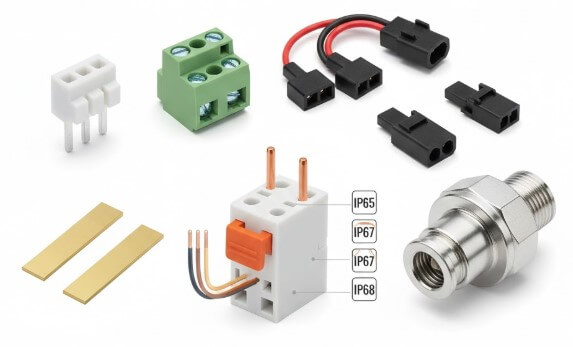
2-Pin Connector Overview
A 2-pin connector is a compact electrical component with two metal contacts that let power or a simple signal flow between two points. One side carries pins, and the other has matching sockets. When they lock together, they keep the wires aligned, insulated, and held firmly in place.
Because it only has two paths, a 2-pin connector often handles basic power and on/off signals. A suitable choice helps control heat, resist vibration, and keep a stable connection over long periods of use. Knowing its structure and ratings makes it easier to match the connector to the job and maintain it safely.
Main Parts of a 2-Pin Connector
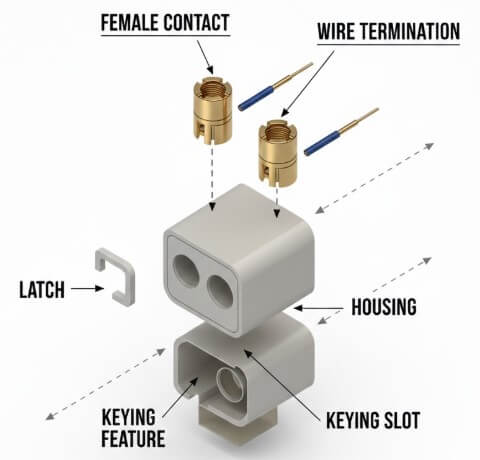
• Housing - The outer shell that insulates the parts inside, keeps the contacts spaced correctly, and helps protect fingers from live metal.
• Contacts/terminals - The metal pieces that touch each other when connected and carry the electrical current.
• Wire termination - The area where the wire is attached to the contact, such as a crimp, solder point, screw, or spring clamp.
• Locking / retention features - Clips, latches, or other shapes that help keep the plug and socket from pulling apart by accident.
• Polarisation/keying - Special shapes or keys that make sure the connector can only be plugged correctly.
Common 2-Pin Connector Styles
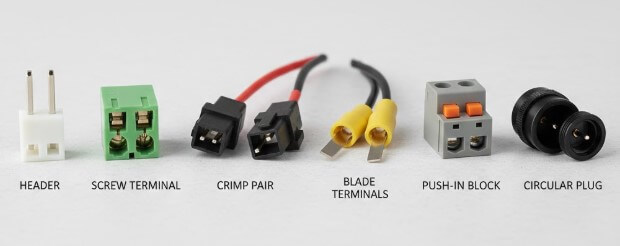
| 2-Pin Connector Style | Strengths | Typical Uses |
|---|---|---|
| Pin header + housing | Small, low cost, and easy to mount on circuit boards | Low-power boards and short internal connections |
| Screw terminal block | Tightened with a tool, easy to rewire, and works with thicker wire | Control panels and power in/out points |
| Crimp plug + receptacle | Strong hold, handles vibration well, good for cable bundles | Vehicle wiring and moving machines |
| Blade/spade terminals | Carry higher current and allow quick connect/disconnect | Inside equipment and main power paths |
| Push-in spring connector | No tools needed for wiring, fast to install | Low-voltage circuits and small junction boxes |
| Circular 2-pin power plug | Round shell, can be sealed, often with a threaded lock | Outdoor power links and remote units |
Electrical Ratings for a 2-Pin Connector
| Parameter | What It Means | Values / Tips |
|---|---|---|
| Voltage rating | Highest safe working voltage between contacts | Small 2-pin: ~50–250 V; power types: up to ~250–500 V |
| Current rating | Max current per contact without overheating | Signal: ~1–3 A; power: ~10–30+ A |
| Contact resistance | How much the joined contacts resist current flow | Lower is better (tens of mΩ); check limits in datasheet |
| Power capacity | Safe watts (V × A) for the connector | Follow the derating chart; higher temperature means less load |
Mechanical Reliability of a 2-Pin Connector
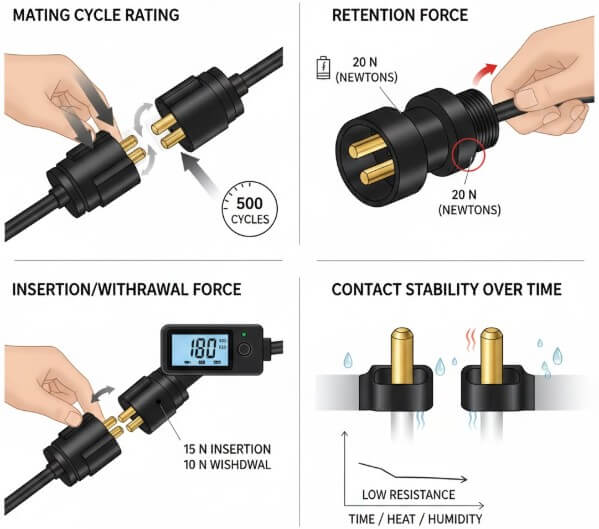
• Mating cycle rating - Shows how many times a 2-pin connector can be plugged in and unplugged before wear starts to affect its performance.
• Retention force - The pull force needed to separate the two halves. Strong latches or threaded parts help a 2-pin connector stay in place when there is movement or vibration.
• Insertion/withdrawal force - How hard it is to push the 2-pin connector together and pull it apart. It must be firm enough for good contact, but not so tight that it is hard to handle.
• Contact stability over time - How well the metal contacts in the 2-pin connector keep pressure and low resistance as they age, even when exposed to heat, moisture, or small movements.
Environmental and IP Protection for 2-Pin Connectors
| IP Rating | Dust Protection | Water Protection |
|---|---|---|
| IP65 | Fully or mostly blocked dust | Low-pressure water jets from any direction |
| IP67 | Completely dust-tight | Short-term immersion in water up to about 1 m |
| IP68 | Completely dust-tight | Long-term immersion as specified by the manufacturer |
Matching Wire Gauge and Insulation for a 2-Pin Connector
A 2-pin connector works best when the wire size fits its crimp, clamp, or solder area. The wire gauge also has to match the current in the circuit, so the cable does not overheat or loosen over time.
Using copper wire, the ranges below give a simple starting point for common low-voltage 2-pin connections:
| AWG Size | Approx. Current Range* | Typical 2-Pin Use Level |
|---|---|---|
| 24–22 | ~1–3 A | Very low-power signal and control lines |
| 20–18 | ~3–7 A | Light DC power for small loads |
| 16–14 | ~7–15 A | Medium DC power paths |
| 12–10 | ~15–30 A | Higher-current DC feeds |
Step-by-Step Way to Choose a 2-Pin Connector
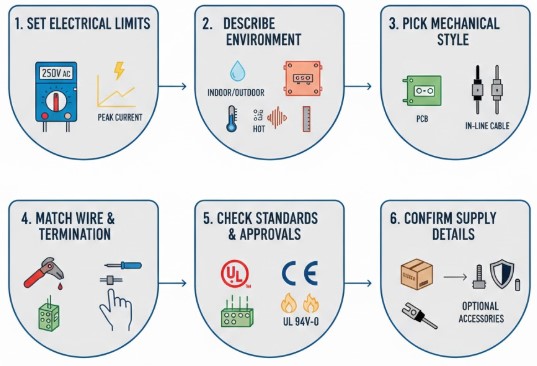
• Set electrical limits - Note the normal and peak voltage and current, including start-up surges, and add a safety margin.
• Describe the environment - Write down if it’s indoors or outdoors, and whether there will be water, dust, vibration, chemicals, or high/low temperatures.
• Pick the mechanical style - Decide if the 2-pin connector mounts on a PCB, panel, or cable, and check how much space you have and how it will be reached.
• Match wire and termination - Choose crimp, solder, screw clamp, or push-in based on how many you will build and how often they may be serviced.
• Check standards and approvals - Select connector families that meet needed safety and flammability ratings.
• Confirm supply details - Verify stock, matching parts, recommended tools, and any extras such as boots or backshells.
Applications of 2-Pin Connectors
Consumer electronics
2-pin connectors link battery leads, small fans, and LED backlights. They work well here because the circuits only need two conductors in a compact, low-cost form.
LED lighting
In LED strips and modules, 2-pin connectors carry DC power and keep polarity clear. They make it simple to join sections and handle basic field wiring.
Automotive
For lamps, small actuators, sensors, and pumps, rugged 2-pin connectors provide steady power and signals while handling heat, vibration, and moisture.
Industrial machinery
Motors, valves, limit switches, and DC feeds often rely on 2-pin connectors. They offer clear plus/minus connections and make swap-out and testing straightforward.
Telecom and networking
Radios and remote units use 2-pin connectors for DC power feeds. The low pin count saves space while still delivering dependable power.
2-Pin Connector Installation Guide
Use the right tools
Use the specified crimp tool, the right torque screwdriver for screw terminals, and a wire stripper that does not damage the copper.
Prepare the wires carefully
Strip only the needed length. Too much bare wire can cause shorts; too little weakens the contact. Lightly twist stranded wire if required.
Assemble and secure the connection
Push wires in fully, make sure locks or latches click, and add strain relief so any pull is taken by the cable, not the contacts.
Test before closing things up
Use a multimeter to check polarity and continuity. For basic circuits, follow any extra test steps in your standards.
Troubleshooting and Caring for a 2-Pin Connector
| Symptom | Likely Cause | Recommended Action |
|---|---|---|
| Intermittent power loss | Loose screw, weak crimp, or bad latch | Tighten or redo the joint, replace the 2-pin connector |
| Local hot spot or smell | Too much current or high contact resistance | Lower the load, choose a bigger 2-pin connector, and change contacts |
| Visible corrosion | Water entry or harsh chemicals | Replace the connector and switch to a sealed 2-pin type |
| Cracked housing or latch | Cable pulled too hard or hit | Add strain relief, reroute the cable, and replace the parts |
Conclusion
A 2-pin connector works well only when its parts, ratings, wire size, and sealing match the job and environment. By following the steps, tables, and checks in this guide, each 2-pin link can stay cool, secure, and reliable, with faults easier to spot, fix, and prevent over time.
Frequently Asked Questions [FAQ]
What material are 2-pin connector contacts made of?
Contacts are usually copper or copper alloy with tin, nickel, or gold plating.
What material is the housing of a 2-pin connector made of?
The housing is moulded from plastics such as nylon or PBT.
Can a 2-pin connector carry both power and data?
Yes, it can carry power and low-speed signals if the circuit is designed for that use.
What happens if DC polarity is reversed on a 2-pin connector?
Reversed polarity can stop the device, trigger protection parts, or damage unprotected electronics.
How often should 2-pin connectors be checked in the field?
Check them during each planned maintenance or service visit for looseness, cracks, or corrosion.


